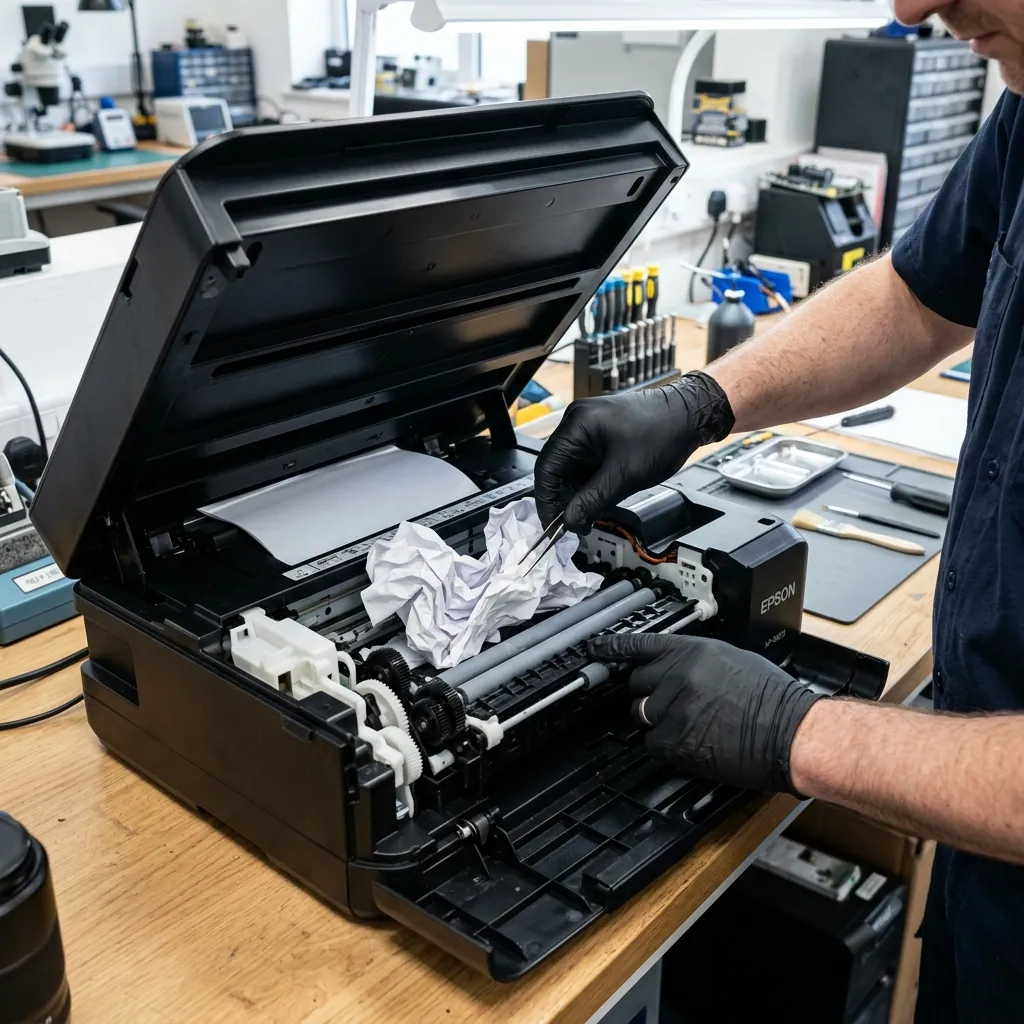
Right in the middle of an urgent print job, your Epson printer abruptly halts, and your computer screen flashes “Paper Jam” or “Paper is jammed inside.” This is among the most frequent mechanical headaches experienced by printer users, and every year thousands of printers suffer catastrophic secondary damage from improper, forceful DIY attempts to yank the paper free.
When addressed with proper technique, a paper jam can be cleared in under 5 minutes without harm. However, pulling paper incorrectly strips internal drive gears, snaps optical sensor flags, and can even gouge delicate printhead nozzle plates. In this guide, we provide a complete engineering walkthrough of safe extraction procedures and permanent workshop remedies.
What Is a Paper Jam?
A paper jam occurs when a sheet of paper becomes physically obstructed inside the printer’s transport path during the feeding or printing cycle. In Epson printers, paper travels through four primary zones: the input feed tray, the pick-up rollers, beneath the reciprocating printhead platen, and the exit ejection rollers. When an obstacle or traction loss interrupts paper transit in any of these zones, optical sensors detect the delay and trip an emergency shutdown.
Error Messages
Epson printers notify users of paper jams via:
- “Paper jam. Remove the jammed paper and press Continue.”
- “Paper Jam” dialog in the driver
- “E-01” or “E-02” hardware error codes (model specific)
- Rapidly flashing orange/red status LED indicators
What Are the Symptoms?
Symptoms of a paper jam typically appear suddenly and unambiguously:
- The printer halts mid-operation with mechanical stoppage
- The sheet emerges partially and freezes, or never exits the internal path
- Unusual crunching, rubbing, or gear-stripping noises occur
- The control panel flashes a persistent paper jam warning
- The Windows print queue locks up, refusing to cancel stuck print jobs
- The printer continues reporting a paper jam even after fresh paper is loaded into the tray
Silent Paper Jam
In many instances, a tiny torn corner from a previous jam remains wedged deep inside the platen channel unnoticed. During subsequent print jobs, this micro-fragment deflects incoming sheets, causing repetitive mysterious jams. The frequent complaint “My printer claims paper is jammed when there is no paper inside” almost always stems from this hidden scenario.
Which Models Are Affected?
While paper jams can happen on any printer, certain Epson families have specific architectural sensitivities:
L Series
- L3110, L3150: Straight vertical paper path; minimal jams when proper paper is selected
- L3250, L3256: Rear feed cassette occasionally develops alignment drift
- L4150, L4160: Automatic duplex units feature tighter feed curves, increasing friction
- L6170, L6190: Heavyweight paper stock requires careful roller traction maintenance
WorkForce Series
- WF-3720, WF-7710, WF-7720: Wide-format printing architectures with lower-tray feed rollers
- Units equipped with Automatic Document Feeders (ADF) can also experience scanning jams
Expression Series
- XP-245, XP-342: Compact chassis with narrow internal paper paths
- XP-4100, XP-5100: Duplex printing requires precise edge alignment
Why Does Paper Jam Occur?
1. Paper Quality and Humidity
Damp, curled, or statically charged sheets cling together. The pick-up roller struggles to separate single sheets, pulling multiple overlapping pages into the platen where they accordion and jam.
2. Worn Pick-Up Rollers
Rubber feed rollers gradually lose their textured tread, becoming smooth and glazed. Worn rollers lose traction: they either fail to advance the sheet or pull it at an angle, causing it to crumple against side walls. In heavy-duty usage, roller wear becomes critical within 2 to 4 years.
3. Debris and Foreign Objects
Aerosolized ink mist, paper dust, paperclips, staples, and small desk items fall into the open top feeder, wedging the feed mechanism.
4. Unsupported Paper Weight or Dimensions
Attempting to feed paper exceeding factory specifications (excessively thick cardstock or flimsy lightweight paper) generates excessive resistance along the feed curve.
5. Guide Alignment Errors
Failing to slide the plastic edge guides snugly against the paper stack allows sheets to enter crookedly.
6. Fragments Remaining from Previous Jams
The most overlooked cause: a tiny ripped triangle left behind in a sensor slot keeps the optical flag tripped, locking the printer in an endless error loop.
What Can Users Do on Their Own?
Step 1: Power Off the Printer
Before attempting to touch the paper, power off the printer. Forcing paper out while the carriage and drive motors are energized risks stripping gear teeth and burning out stepper motors.
Step 2: Open Access Covers
On Epson L-series desktop models, lift the scanner unit to reveal the internal platen and carriage. Open the rear paper feed support flap.
Step 3: Pull Paper Slowly and Straight
- Grasp the visible edge of the jammed sheet
- Use both hands with balanced, gentle force
- Pull smoothly in the direction of the paper path—never jerk diagonally or tear sideways
- If you encounter heavy resistance, do not force it; try gently easing it from the opposite side
Step 4: Verify Zero Residual Fragments Remain
Inspect the internal paper path using a flashlight. If a corner has torn off, carefully remove it with tweezers. Leaving even a 5 mm piece inside will cause an immediate jam on the very next print.
Step 5: Power On and Clear Queue
Once the path is verified clean, close all covers and turn on the printer. Press the Resume/Continue button. If the error lingers, power cycle the printer completely.
Step 6: Run a Test Print
Send a single blank or test page to verify that the mechanical feed train cycles normally.
When Is Technical Service Required?
Contact ProTech Bilgisayar if:
- The paper is jammed deep inside inaccessible drive gears
- The sheet ripped into shreds that cannot be reached safely
- The “Paper Jam” error persists even though the paper path is 100% empty
- Loud grinding or clicking gear noises occur when the feed motor starts
- Paper consistently feeds crookedly or skews across the platen
- Jams repeat on every single sheet fed
Permanent Solution: Our Workshop Repair Process
At ProTech Bilgisayar, our workshop follows a meticulous mechanical protocol:
1. Complete Paper Path Teardown
The printer chassis is partially or fully disassembled to clean dust, dried ink residue, and paper fibers from all internal feed guides.
2. Roller Inspection and Replacement
Pick-up and separation rollers are tested for durometer firmness and tread depth. Worn rollers are replaced with genuine OEM rubber assemblies. Roller replacement is the definitive fix for chronic paper jams.
3. Paper Path Sensor Calibration
Optical sensors and mechanical flag levers are tested. Contaminated photo-interrupters are cleaned and damaged sensor flags are replaced.
4. Printhead Carriage Realignment
If a violent jam deflected the carriage assembly, the printhead is checked for levelness and optically calibrated.
Preventing Paper Jams
- Load trays properly: Do not exceed the maximum stack line; adjust side guides snugly
- Use quality paper: Keep paper sealed in moisture-proof packaging; discard warped sheets
- Respect weight ratings: Verify that paper grammage falls within supported printer limits
- Routine maintenance: Annual workshop cleaning drastically reduces mechanical failure rates
Related Services
- Printer Repair Services Antalya — Comprehensive workshop repairs
- Epson Service Required Error — Waste counter reset solutions
- Epson Waste Ink Pad Replacement — Absorber pad maintenance
Frequently Asked Questions
Epson yazıcıda kağıt sıkıştı, ne yapmalıyım?
First power off the printer. Open access covers and pull the trapped paper slowly and straight with both hands. Never pull forcefully or sideways. Inspect with a flashlight to ensure zero fragments remain.
Epson kağıt sıkışması hatası kağıt olmadan da çıkıyor — neden?
Either a tiny torn scrap remains wedged in the paper path, or an optical sensor flag is dirty or fractured. Both require workshop inspection.
Epson neden sürekli kağıt sıkıştırıyor?
The most frequent culprit is worn rubber pick-up rollers. Rollers become glazed over time and lose traction. In active use, roller replacement is necessary every 2 to 4 years.
Kağıt sıkışmasından sonra baskı kalitesi bozuldu — neden?
A violent jam can knock the printhead carriage out of alignment, causing banding or blurred lines. Our service center runs precision head calibrations.
Epson yazıcı kağıt almıyor ama sıkışma hatası da vermiyor?
The rollers are so severely worn that they cannot grip the paper at all. The printer misses the sheet entirely rather than jamming. Roller replacement is required.
📞 0850 220 4323 — Same-day service for Epson paper jam removal and roller replacement in Antalya.
ProTech Bilgisayar — Professional Epson printer maintenance and repair center in Antalya.
Frequently Asked Questions
What should I do if paper is jammed in my Epson printer?
First power off the printer. Open all access covers and pull the trapped paper slowly and evenly with both hands. Never pull forcefully or sideways. Once extracted, check with a flashlight that no torn scraps remain, then restart.
Why does my Epson give a paper jam error when there is no paper stuck?
There are two main causes: either a microscopic torn scrap remains lodged in the feed path, or the optical paper sensor flag is dirty or fractured. Both require workshop disassembly and cleaning.
How is a paper jam fixed on an Epson L3110?
On the L3110, jams occur most frequently in the rear feeder and central platen. Lift the scanner unit to access the internal path and pull the sheet slowly. If jams recur, the pick-up rollers are worn and require replacement.
What happens if paper tears while pulling it out of an Epson printer?
Tiny torn fragments remain trapped along the path, blocking the subsequent sheet and causing immediate repeat jams. Sharp fragments can also damage the printhead carriage or unseat optical sensor levers.
Why does my Epson printer repeatedly jam paper?
Repeated jams are overwhelmingly caused by worn rubber pick-up rollers. Over 2 to 4 years of active use, rubber loses tread and slips. Other causes include damp paper, incorrect weight, or foreign debris in the tray.
How long does paper jam repair take?
A straightforward clear takes 5 to 10 minutes. If paper path disassembly, sensor repair, or roller replacement is required, servicing takes 1 to 2 hours. At ProTech Bilgisayar, repairs are completed the same day.
Paper is jammed in the ADF module of my Epson WF-7710. What should I do?
Open the ADF cover and gently ease out the jammed document. Check the ADF roller chute with a flashlight. The ADF mechanism is mechanically independent from the main internal feed path.
Why did print quality degrade after clearing a paper jam?
A violent jam or forceful extraction can knock the printhead carriage out of alignment, causing banding or skewed lines. Our service center runs precision mechanical head alignments.
The printer won't pull paper but doesn't show a paper jam error either. What is wrong?
This indicates advanced roller wear. The rollers have become so slick that they cannot grip the sheet at all; the printer misses the feed entirely rather than jamming. Roller replacement is required.
Paper curls or wrinkles as it enters the Epson printer. What should I do?
Wrinkling is caused by damp paper, high ambient humidity, or misaligned feed rollers. Adjust the feed guide tabs and use fresh, flat paper. If wrinkling continues, have the feed alignment inspected.
Can clearing a paper jam damage the printhead?
Yes. If you violently yank paper while the printer is running, the paper can strike the underside of the printhead, shattering nozzle plates and plastic alignment guides. Always turn off power first.
Is paper jam repair covered under Epson warranty?
A paper jam is classified as physical mechanical maintenance. Warranty coverage depends on printer age and country of purchase. If warranty has expired, ProTech Bilgisayar provides repairs with a 90-day warranty.
How much does replacing Epson pick-up rollers cost?
Pricing depends on the chassis model and roller kit availability. ProTech Bilgisayar provides free initial inspection and announces fixed quotes before work commences.
My Epson L3250 jams paper during double-sided printing. Is this normal?
During manual duplex printing, re-feeding already printed and curled paper can cause alignment snags. Flatten sheets before reloading and adjust side guides snugly.
How often should Epson printer feed paths be cleaned?
We recommend professional feed path cleaning once a year for home use and every 6 months for busy offices to extend roller lifespan and eliminate jam risks.
Can I get Epson paper jam repair service in Antalya?
Yes. ProTech Bilgisayar provides same-day paper jam extraction, sensor calibration, and pick-up roller replacement for all Epson models in Antalya. Call 0850 220 4323 for appointments.